
Life-Coaches.Ca
Account vs. Profile: What’s the Difference?
Your Account and your Profile aren’t the same thing. Here’s what each one is for, where to find them, and how to log out.
What happens when you log in: Your Profile
When you log in at life-coaches.ca/login, you’re usually taken straight to your Profile page — not your Account. Your Profile is already one step inside your account area, and it’s where your actual coach listing lives.
From here, click the blue Edit button on your listing. That opens the same kind of form you originally used to create your profile — the one place to update your bio, photo, specialties, and everything else visitors see. For the full walkthrough, see How to Update Your Listing.


You'll normally see just one listing
Your Profile page has a “Listings” tab showing your coach card, with its status (Published or Not Published) and an Edit button. Most coaches have exactly one listing here — if you ever see more than one and aren’t sure why, write to us.
Getting to your Account
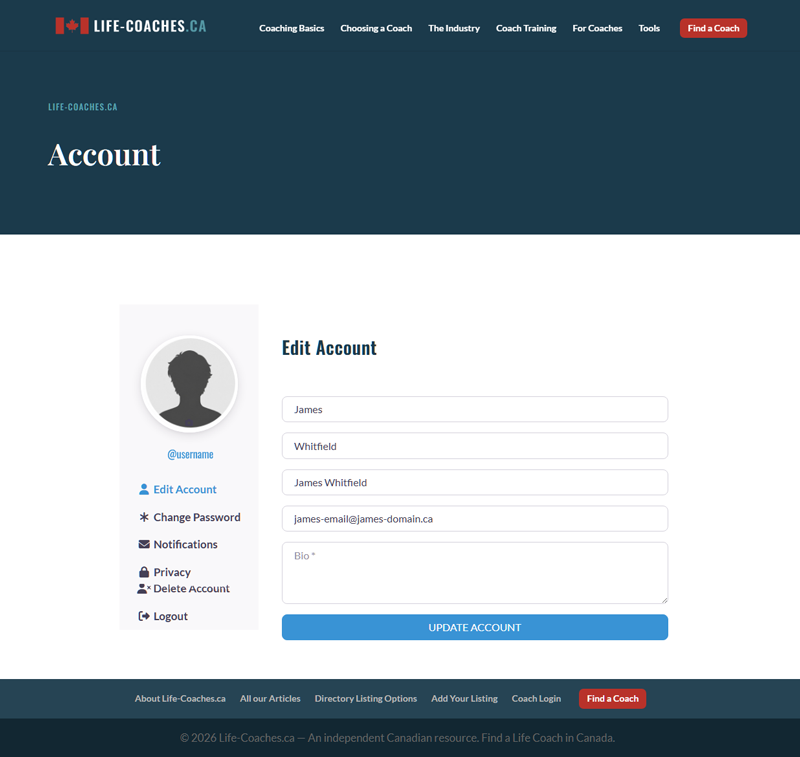
Your Account is a separate area — your name, email, password, and a short bio field. It’s the “who you are” part of your login, not your public listing, and nothing here is visible to someone browsing the directory.
To get there from your Profile page, click the small pencil icon next to your name at the top of the page.
That takes you into your Account, where the left-hand menu lets you:
- Edit your name, email, and password
- Manage notification preferences
- Adjust privacy settings
- Log out — this is the one people usually go looking for. It’s here, not on your Profile page.
The short version

Account
Your login — name, email, password. Private. Also where you log out.
Profile
Your public listing — bio, photo, specialties. What visitors actually see.
If you’re trying to update what people see when they find you in the directory, you want your Profile, not your Account. For step-by-step instructions on that, see How to Update Your Listing.
Still have questions?
If something isn’t working the way it should, reply to any email from our team, or write to us directly at team@life-coaches.ca.